A New Aftersales Service Platform
A future-state experience designed to help service teams work faster with greater visibility and coordination
Platforms
Salesforce DMS, Field Service
Deliverables
Research, Concept Design, Prototypes
Expertise
UX Research, Service Design, iA, UI / UX Design
Year
2025


Project Overview

Designing a More Connected Aftersales Experience
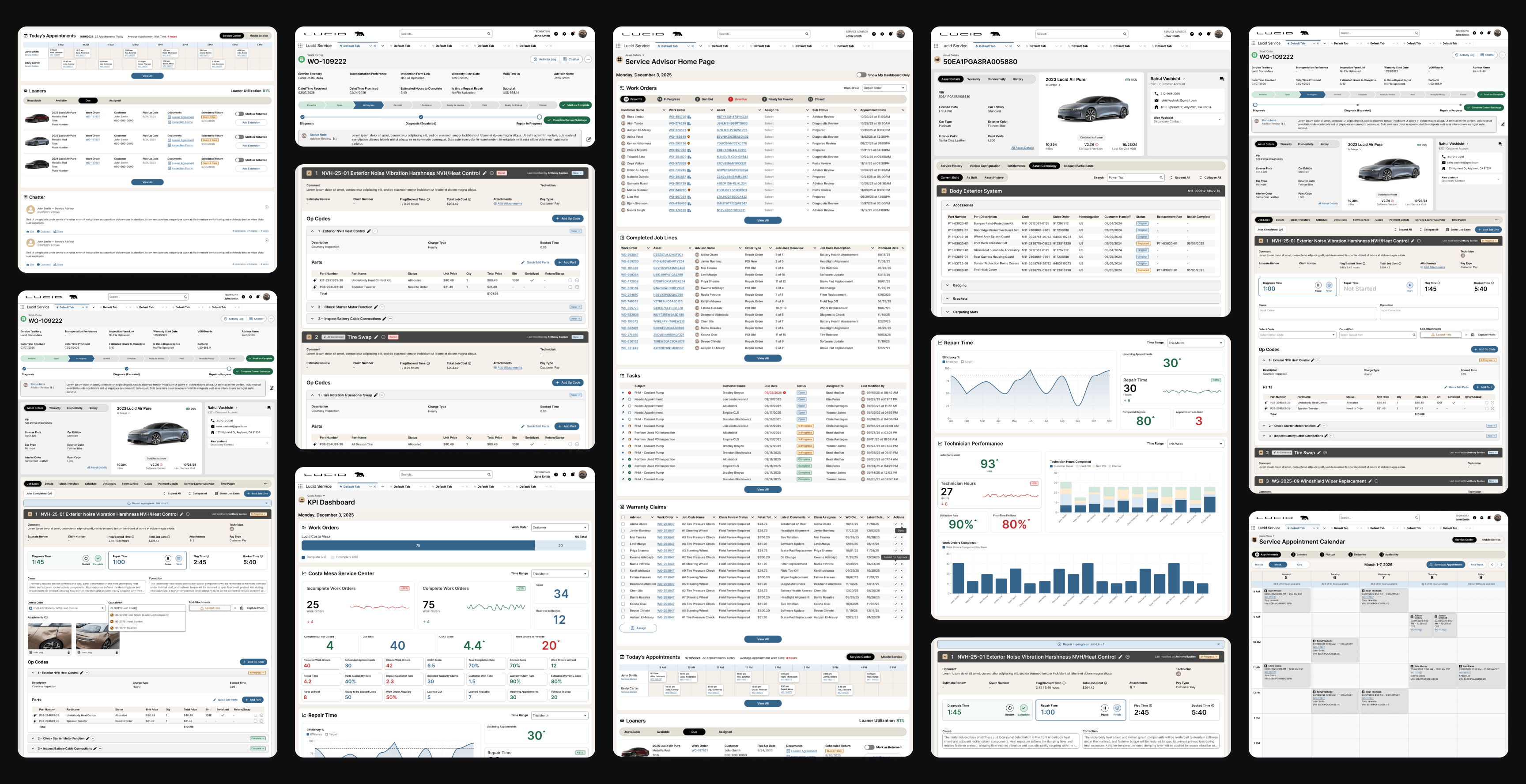
Lucid partnered with Capgemini to define a future-state vision for its Dealer Management System, with a focus on improving how service advisors, parts advisors, service technicians, shop foremen, and service managers work across aftersales operations. The opportunity centered on reducing workflow friction inside Salesforce, bringing disconnected tools and data into a more unified experience, and creating role-specific concepts that could better support intake, parts fulfillment, diagnostics, documentation, dispatching, and shop oversight. The work combined role-based research, current-state journey mapping, and future-state concept design to shape a more efficient and scalable service operations platform.
Research Approach

Grounding the Vision in Real Service Operations
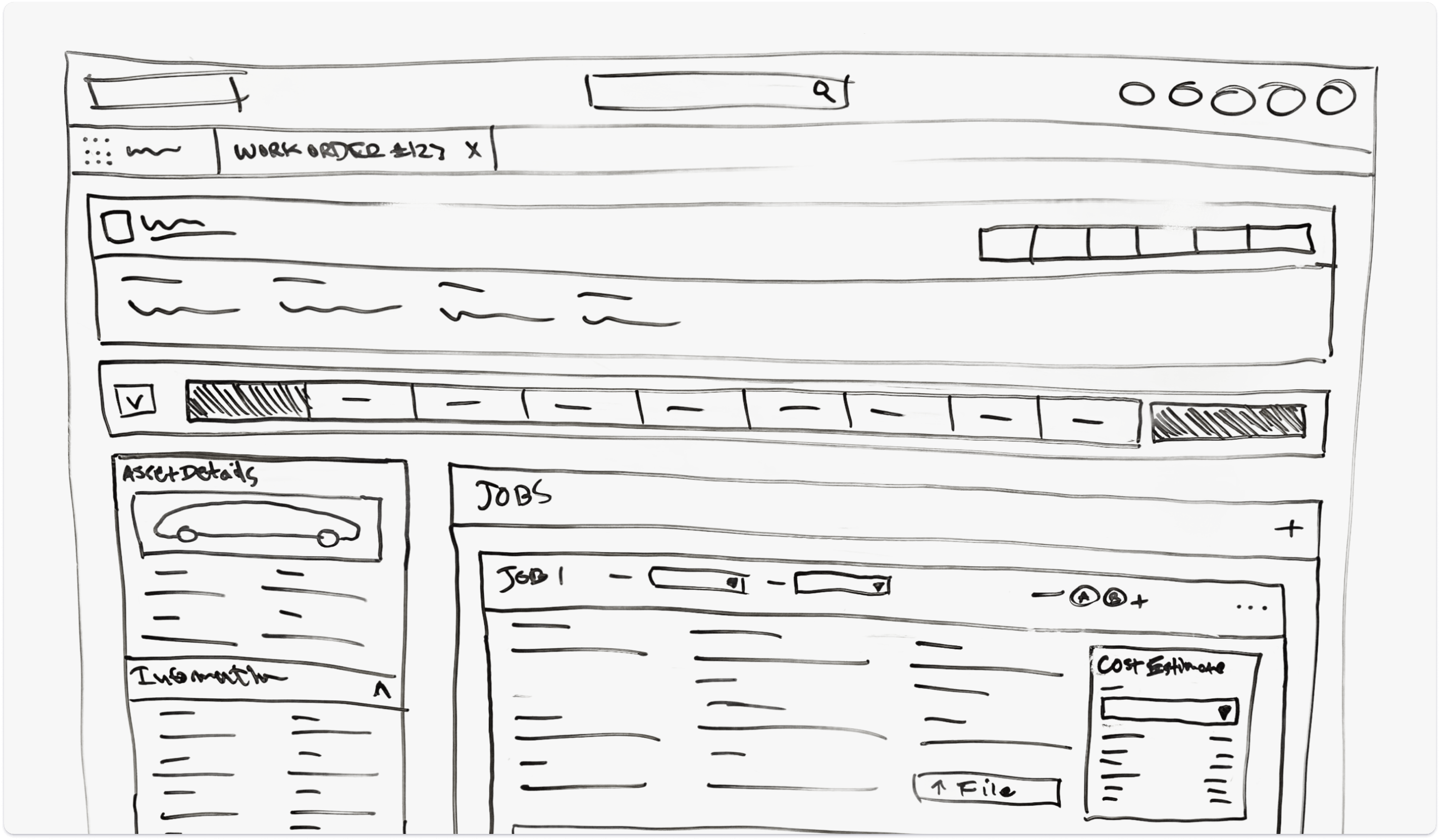
The project was grounded in qualitative research across six core user groups: service advisors, parts advisors, service technicians, mobile service technicians, shop foremen, and service managers. Sessions were structured around real workflows, pain points, tool usage, and daily responsibilities, with live walkthroughs used to surface friction inside the current Salesforce-based DMS. The research covered service centers across the US, Europe, and Saudi Arabia, helping the team understand both shared pain points and important regional differences.
Who We Learned From
To inform future-state design, we first needed to deeply understand how employees are currently working within Lucid’s DMS and surrounding tools. Through interviews with frontline and management roles across Service and Parts, we reconstructed the real-world workflows, tools, pain points, and workarounds used.
Service Advisors
Manage appointments, create work orders, communicate with customers, coordinate repairs with technicians and parts, and finalize billing.
Parts Advisors
Identify, order, and track parts, manage stock levels, fulfill technician and advisor requests, and update order status and ETAs.
Service Technicians
Diagnose vehicle issues, perform repairs, request parts, and record job details, photos, and diagnostic results in the system.
Shop Foremen
Assign work orders, balance technician workloads, monitor progress, and ensure jobs move efficiently through the repair process.
Service Managers
Track KPIs, manage team schedules, review productivity, and ensure service quality and throughput targets are met.


Key Research Themes
Click-Heavy Workflows
Across roles, participants described the DMS as overly click-heavy and inefficient. This made simple work feel heavier than it should and created visible delays across the service experience.
Fragmented Data and Tools
Critical information was spread across many disparate tools. That fragmentation slowed work, increased onboarding difficulty, and created a constant need for manual reconciliation.
Automation and Feature Gaps
Many of the most common tasks still depended on manual entry, line-by-line updates, or duplicate documentation. The absence of automation created avoidable rework across the platform.
Limited Real-Time Operational Visibility
Managers and foremen lacked a true live operational view of shop performance. This forced leaders to rely on manual processes to understand what was happening in the shop.
Experience Strategy
Turning Operational Friction Into Design Direction
Research showed that the current DMS was functional, but weighed down by too many clicks, disconnected systems, repetitive manual tasks, and limited real-time visibility. Employees could usually get work done, but often through workarounds, cross-checking, and extra effort. The experience strategy focused on simplifying workflows, improving visibility, reducing duplication, and creating a more role-aware platform that better supports the pace and complexity of real service operations.
Strategic Principles
Reduce Workflow Friction
Routine tasks should take fewer steps and require less page-hopping.
Surface the Right Context Earlier
Critical information like vehicle history, parts status, workload, and communication history should appear where decisions happen.
Support Role-Specific Work
Advisors, parts teams, technicians, and managers each need workflows shaped around how they actually operate.
Create a Stronger Operational View
Leads and managers need live insight into throughput, aging work, technician load, and blockers to manage proactively.


Role-Based Experiences
Service Advisor Concepts
Supporting the Full Service Journey From Intake Through Customer Handoff
Service Advisors are responsible for keeping the service experience moving from the moment a customer arrives through repair coordination, communication, approvals, and final closeout. The concepts for this role focused on reducing administrative friction, bringing more context into the workflow, and making core tasks like intake, scheduling, work order management, loaner coordination, and invoicing feel more connected and easier to manage.
Service Center Dashboard
Creating a Clearer Operational Starting Point
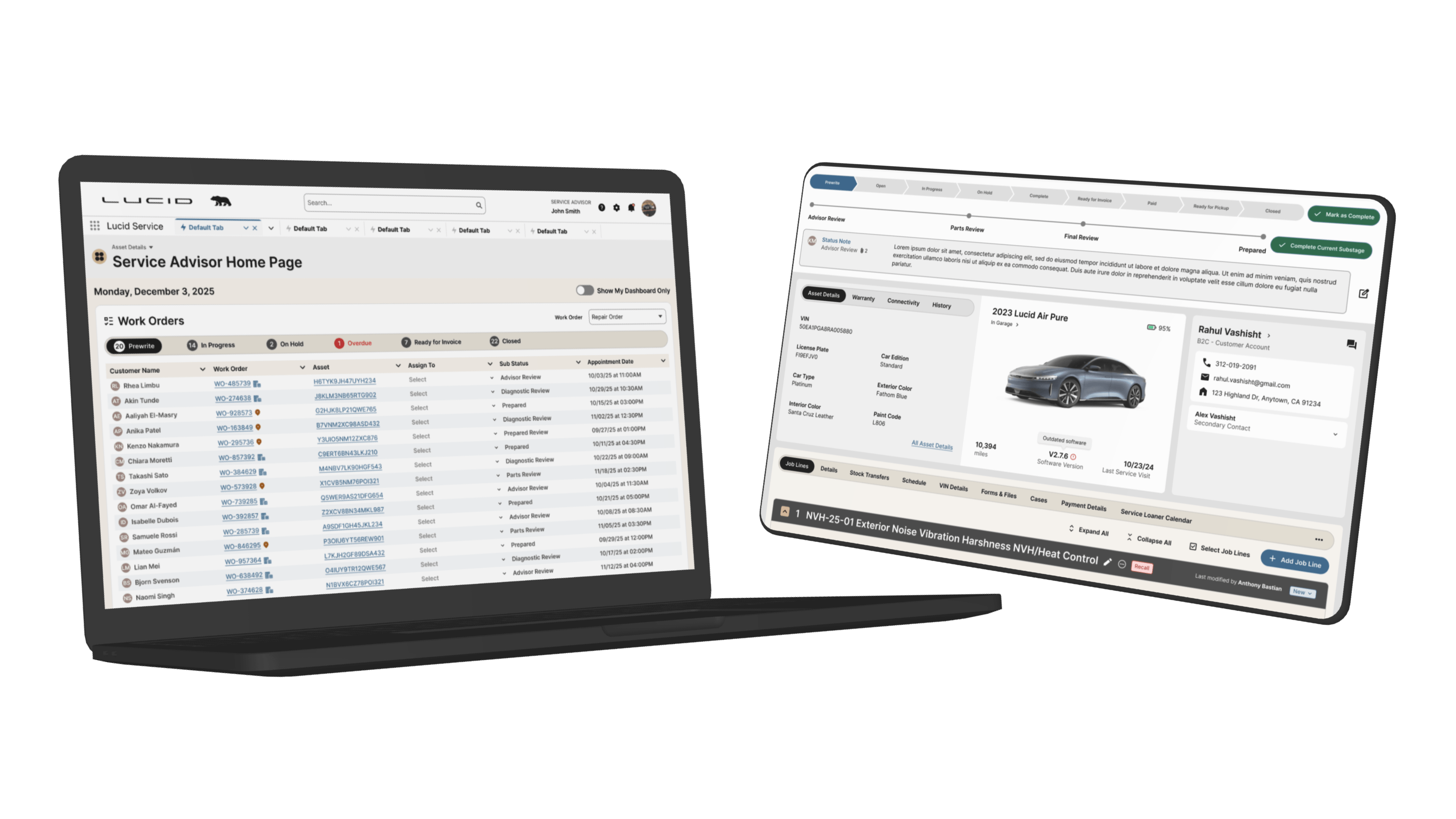
The Service Center Dashboard was designed to give advisors a more centralized view of daily activity, including open work, upcoming appointments, vehicle status, and areas that need attention. Research showed that advisors often had to piece together this information across multiple screens and tools, which made it harder to prioritize work quickly and stay ahead of customer needs.
Why it mattered:
- Helped advisors understand daily priorities faster
- Reduced reliance on disconnected dashboards and reports
- Surfaced important service activity in one place
- Supported faster decision making throughout the day
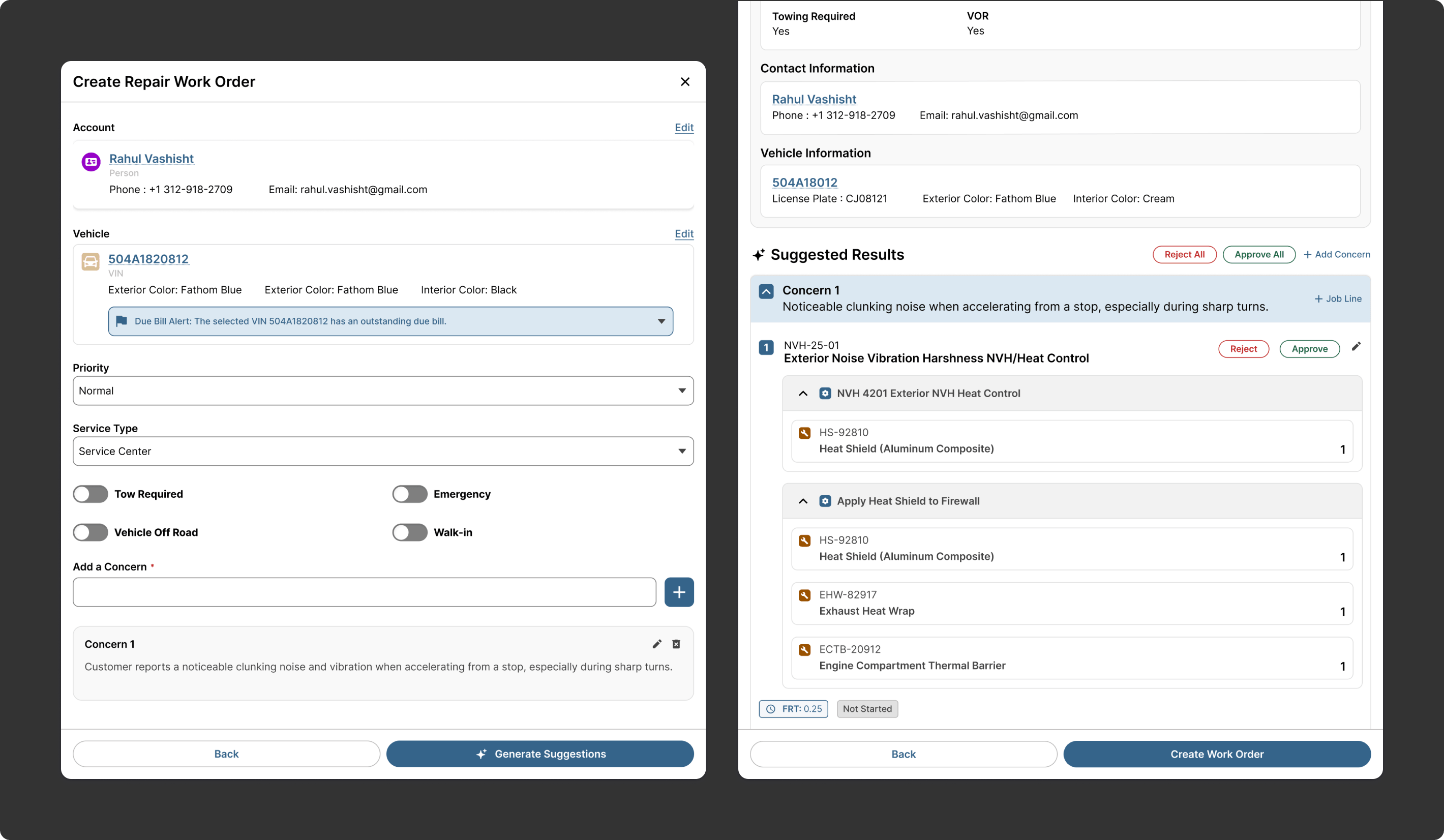
Create Work Order
Simplifying the Move From Customer Concern to Repair Setup
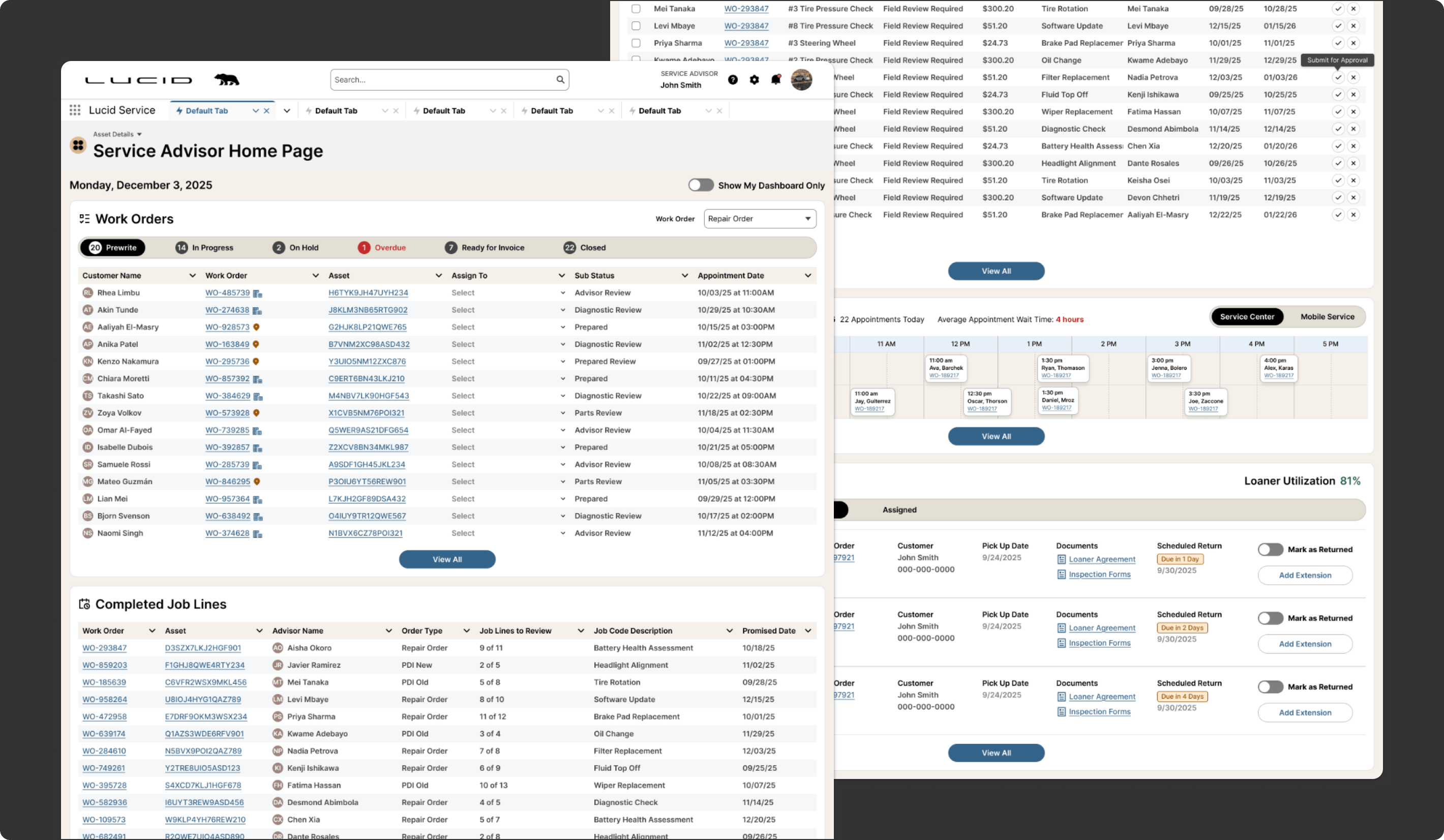
The Create Work Order experience was designed to make intake more efficient by reducing manual entry and helping advisors move more easily from customer concern to structured repair setup. The concept focused on capturing the right information earlier, organizing job creation more clearly, and creating a smoother path into downstream service workflows. It also introduced an AI-driven assistive layer that could help interpret customer-reported issues and suggest likely job lines, op codes, or repair-related details, helping advisors move faster while improving consistency at the start of the service process.
Why it mattered:
- Reduced friction during intake
- Improved consistency in work order setup
- Helped advisors move faster into active repair workflows
- Introduced AI support for translating customer concerns into structured service inputs
- Created a cleaner starting point for the rest of the service process
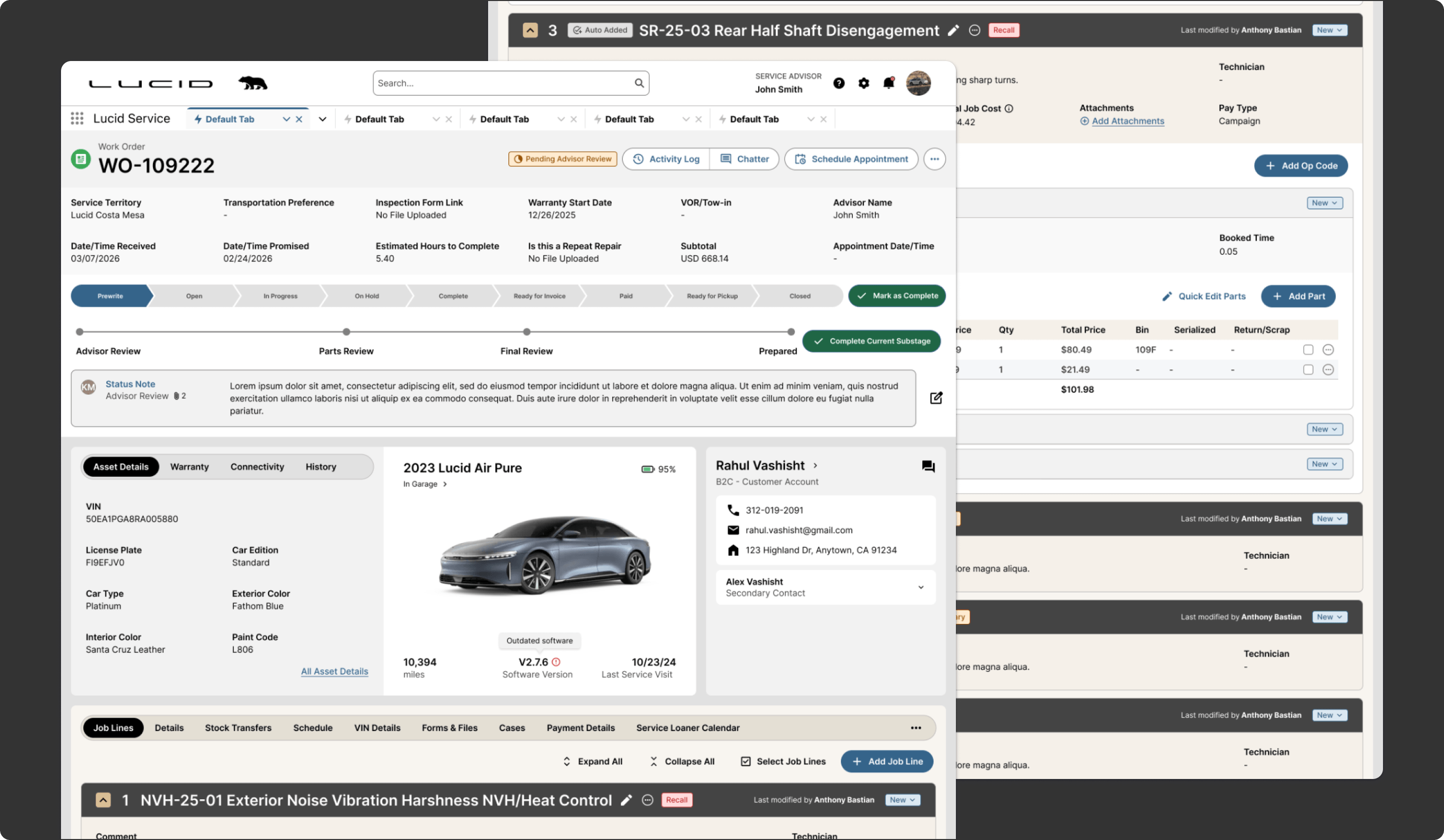
Work Order Page
Turning the Work Order Into a More Connected Advisor Workspace
The Work Order Page was redesigned to bring customer information, vehicle details, job lines, service status, and related actions into a more unified workspace. Research showed that advisors were constantly moving between screens to manage repairs, update information, and coordinate with the shop. This concept made the work order feel more like the center of the workflow rather than just one step inside it.
Why it mattered:
- Reduced page switching during core tasks
- Improved visibility into repair status and details
- Connected more of the advisor workflow into one experience
- Supported faster updates and coordination
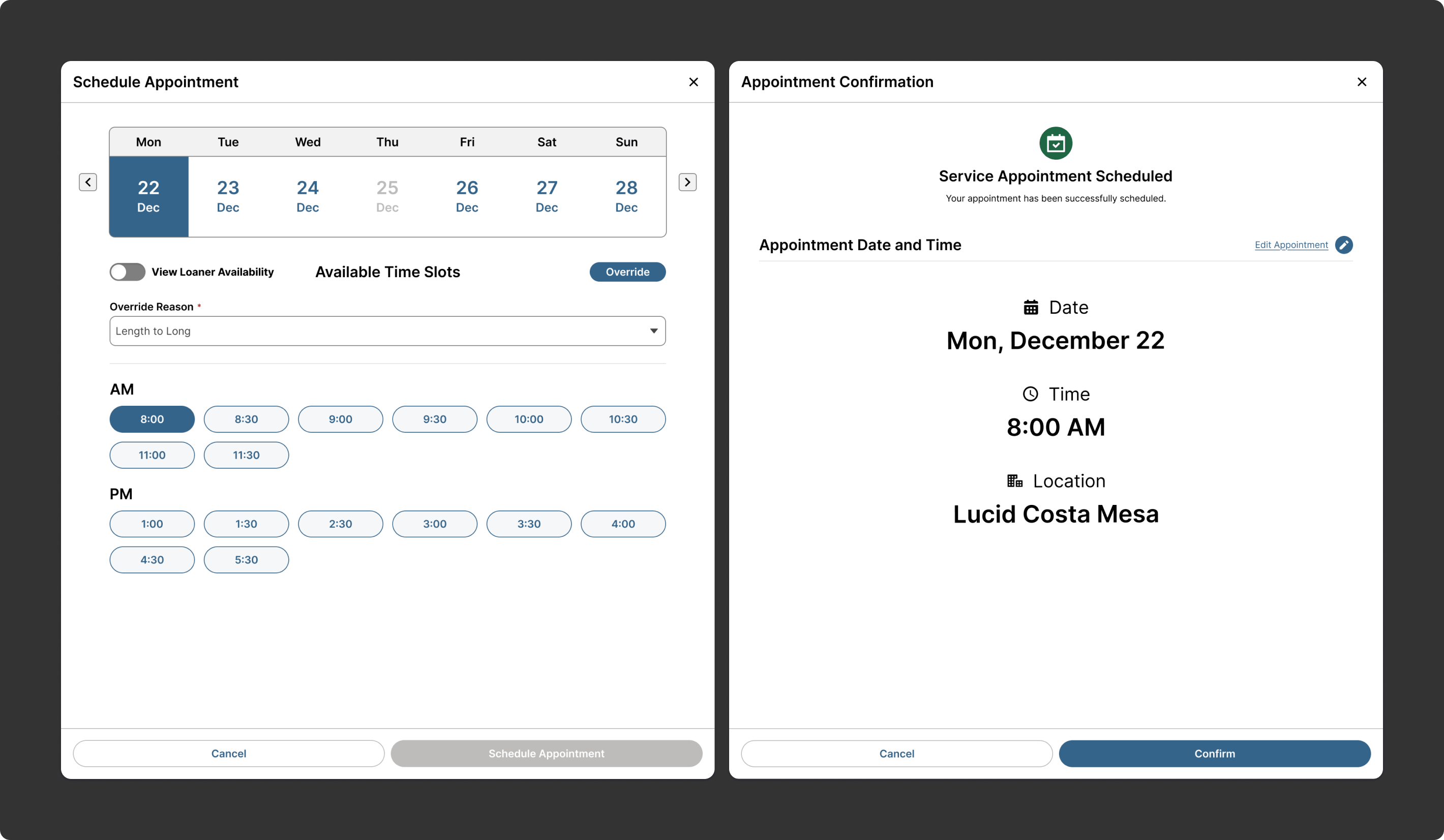
Schedule Appointment
Making Scheduling Easier to Manage and Easier to Trust
The Schedule Appointment concept was designed to support intake and planning with a clearer scheduling experience that helps advisors understand availability, appointment timing, and service logistics. Since appointment setup affects the rest of the service journey, the goal was to create a workflow that feels more structured, more efficient, and better connected to what happens next.
Why it mattered:
- Improved clarity during appointment booking
- Helped advisors plan service more effectively
- Reduced friction at the front end of the workflow
- Supported better readiness for both customers and the shop
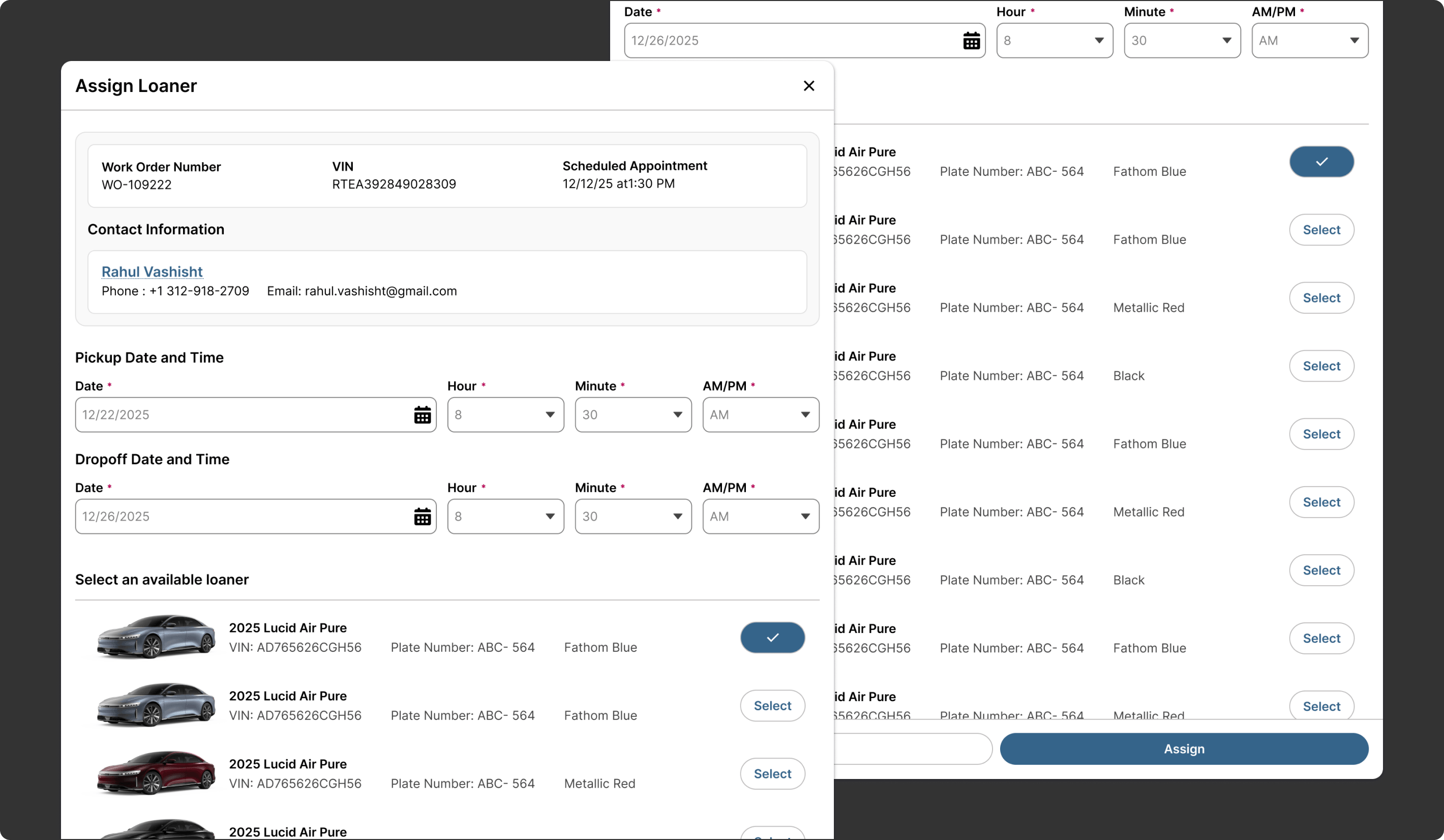
Assign a Loaner
Connecting Transportation Support More Directly to the Service Workflow
The Assign a Loaner concept was designed to make loaner coordination easier by tying availability and assignment more closely to the advisor workflow. Rather than treating loaners as a separate operational task, the experience was structured to help advisors quickly understand what is available and take action without unnecessary back-and-forth.
Why it mattered:
- Made loaner coordination easier to manage
- Improved visibility into availability and assignment
- Reduced extra steps during service planning
- Supported a smoother customer experience
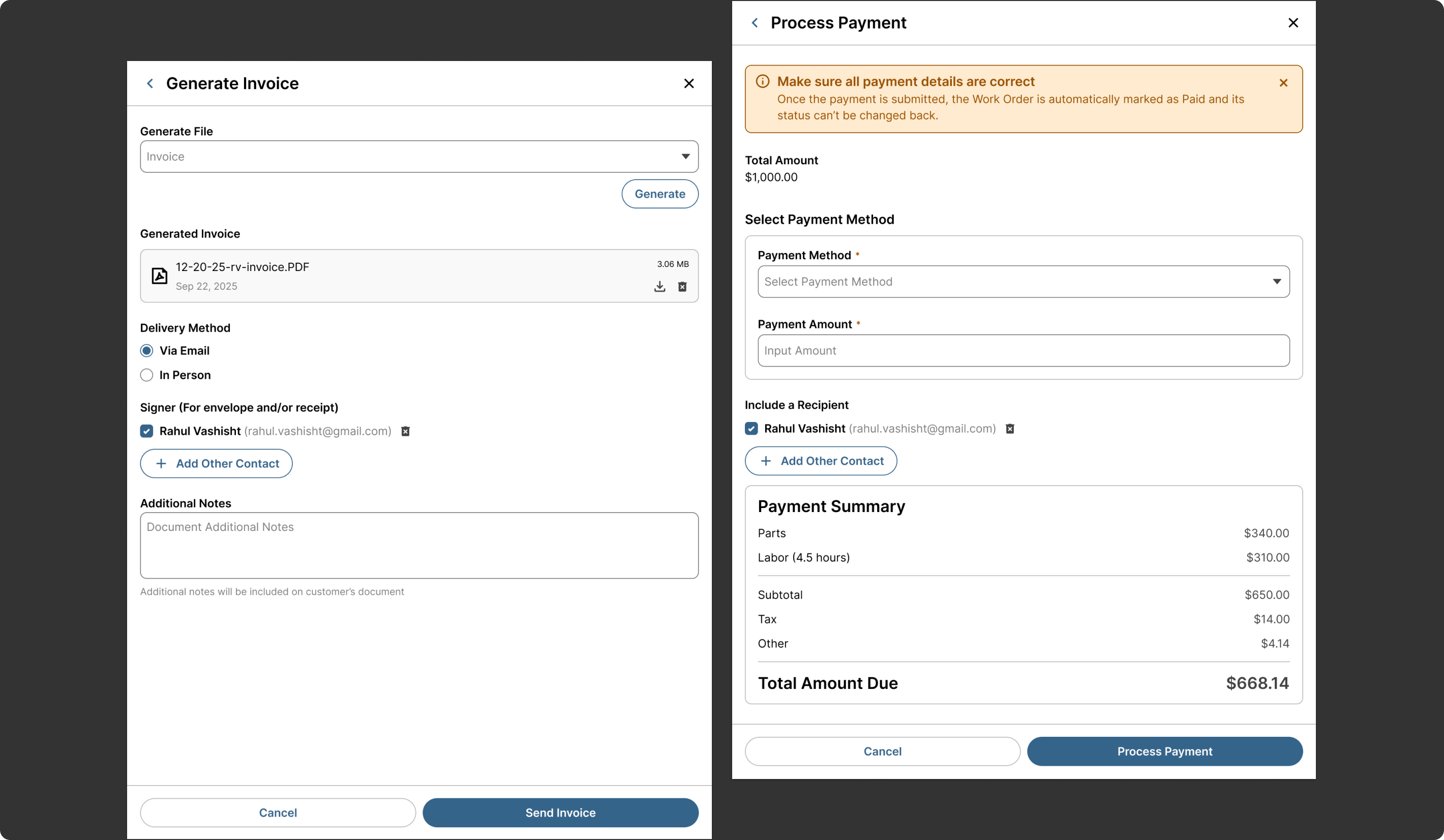
Generate Invoice and Process Payment
Streamlining Approval, Payment, and Final Service Closeout
The Generate Invoice and Process Payment concepts focused on simplifying a critical part of the advisor workflow that often carries a lot of manual effort. The experience was designed to support invoice generation and payment processing in a way that feels more direct, more readable, and easier to complete within the broader work order flow.
Why it mattered:
- Reduced friction during final service closeout
- Supported clearer customer-facing documentation
- Helped advisors move more efficiently from repair to payment
- Improved continuity across approval and invoicing tasks
Parts Advisor Concepts
Improving Parts Fulfillment, Inventory Visibility, and Work Order Support
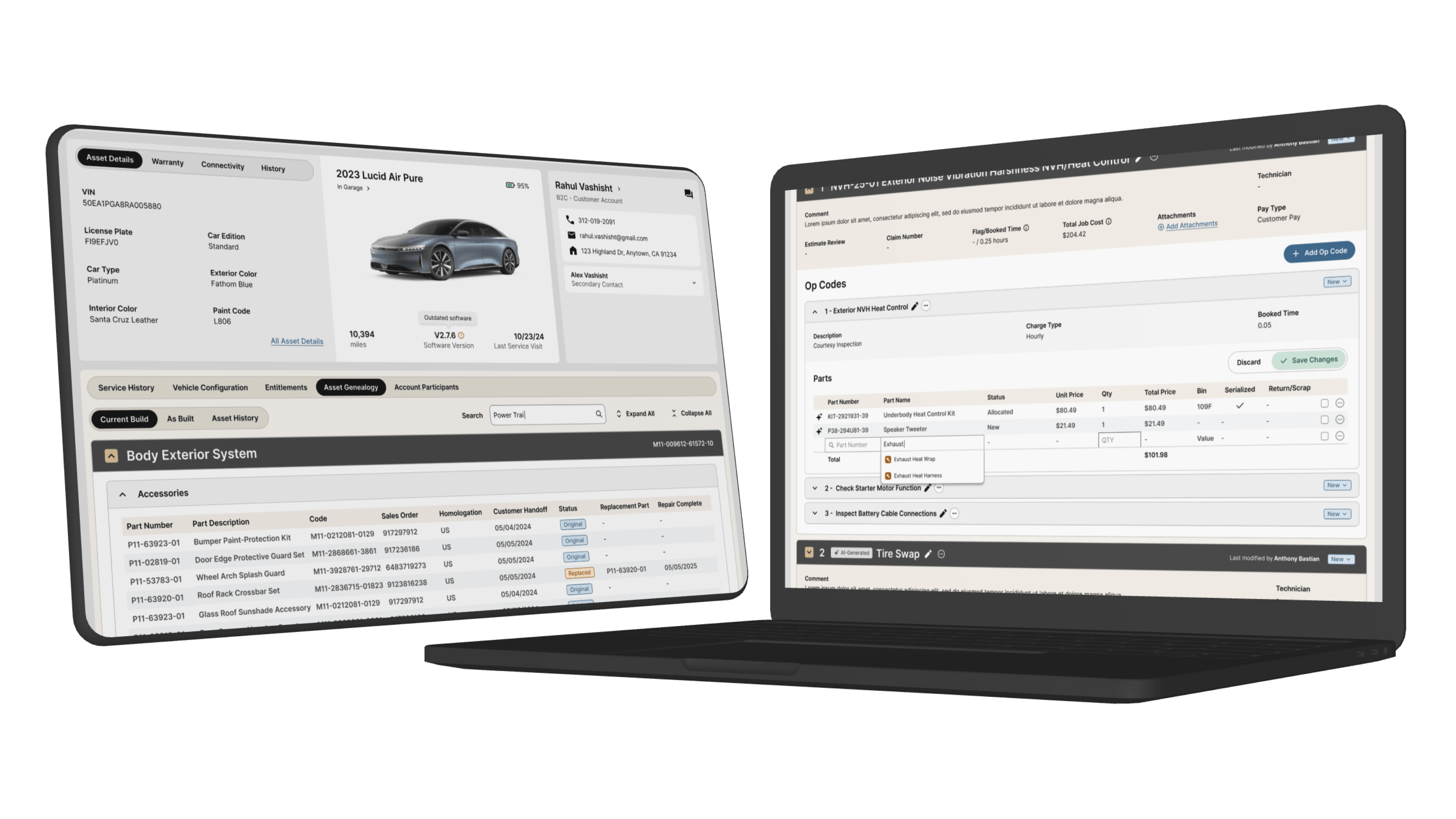
Parts Advisors play a critical role in keeping repairs moving by finding the right parts, managing stock availability, supporting technician needs, and handling over-the-counter requests. The concepts for this role focused on reducing workflow fragmentation, improving visibility into inventory and vehicle-specific parts information, and making parts-related actions feel more connected to the active service workflow.
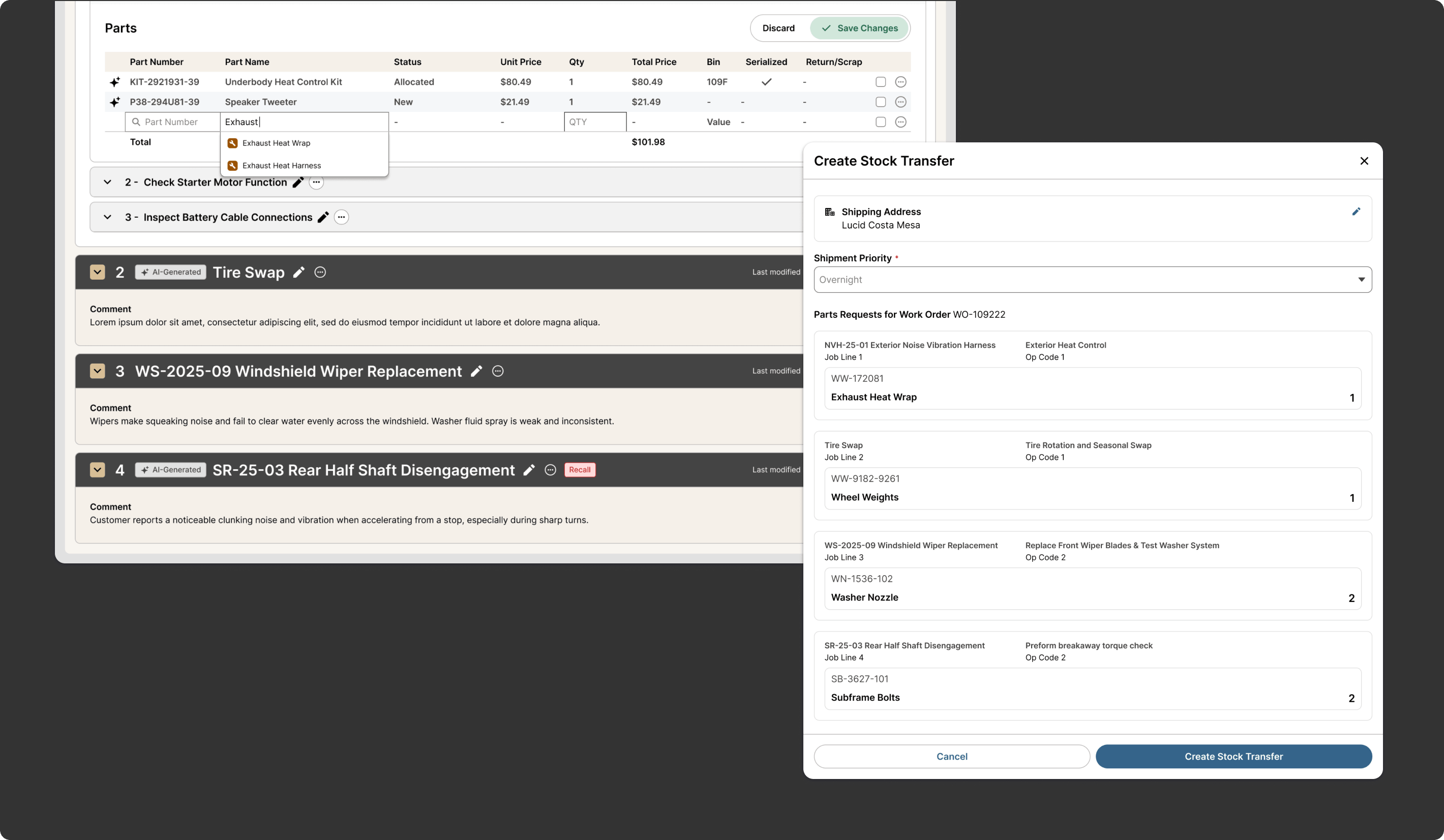
Work Order Parts & Stock Transfer
Bringing Parts Fulfillment More Directly Into the Repair Workflow
The Parts section of the Work Order Page and Stock Transfer concepts were designed to support how parts teams work within the context of active repairs. Research showed that advisors often had to jump across systems and screens to understand part availability, request transfers, and keep work moving. These concepts aimed to make parts actions more immediate, contextual, and easier to manage from within the work order.
Why it mattered:
- Improved visibility into parts activity tied to active repairs
- Reduced friction when requesting or transferring stock
- Helped parts teams act faster in support of service work
- Created a more connected fulfillment workflow
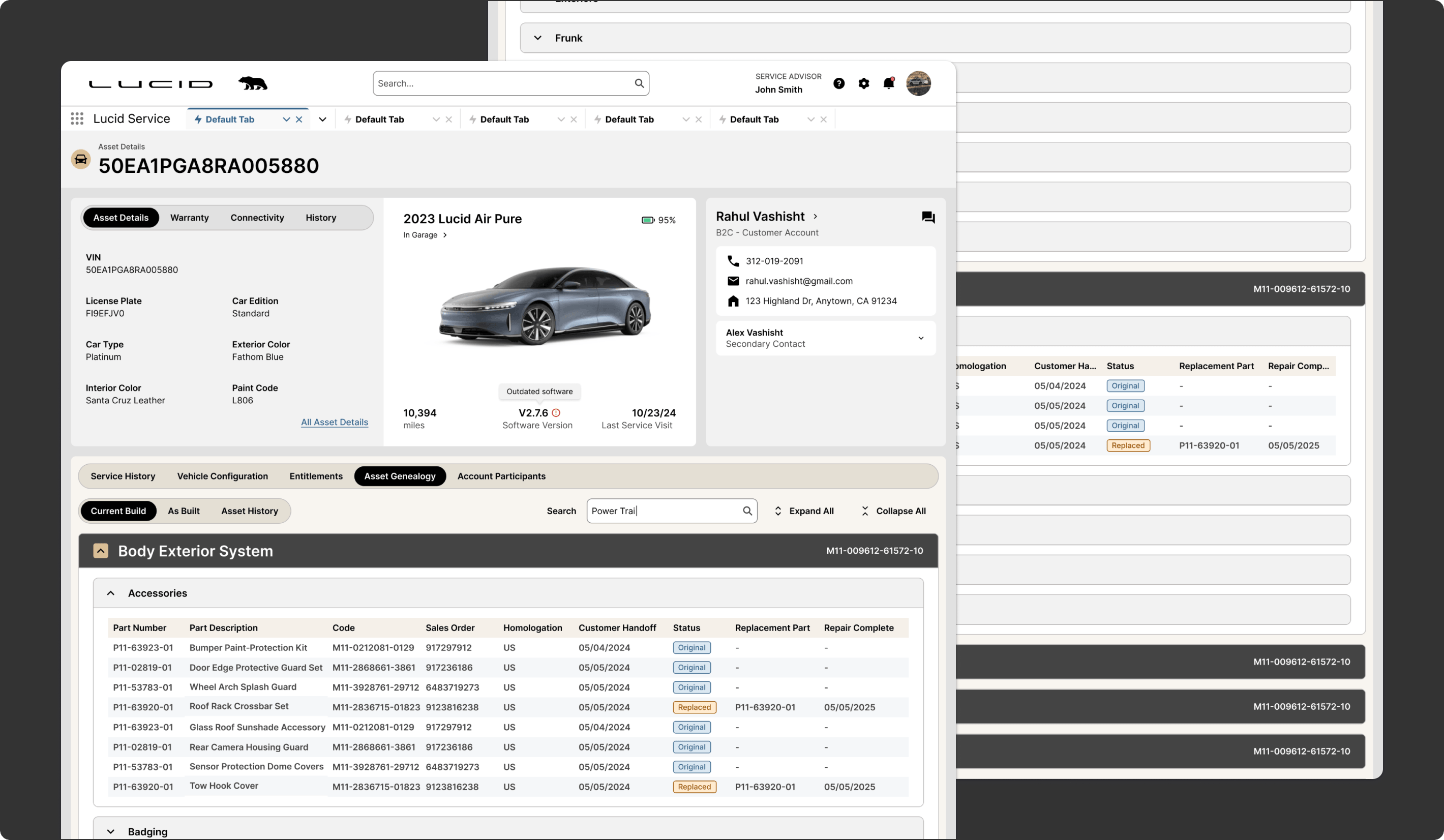
Vehicle Genealogy
Making Vehicle-Specific Parts Context Easier to Understand
The Vehicle Genealogy concept was designed to give parts teams better access to the configuration and history needed to identify the right parts with greater confidence. Research showed that critical information related to fitment, configuration, and prior service was not always easy to access inside the current workflow. This concept helped bring more vehicle-specific context into the parts process.
Why it mattered:
- Improved confidence in parts selection
- Reduced dependency on separate systems for context
- Helped teams make faster, more informed decisions
- Supported more accurate fulfillment tied to vehicle specifics
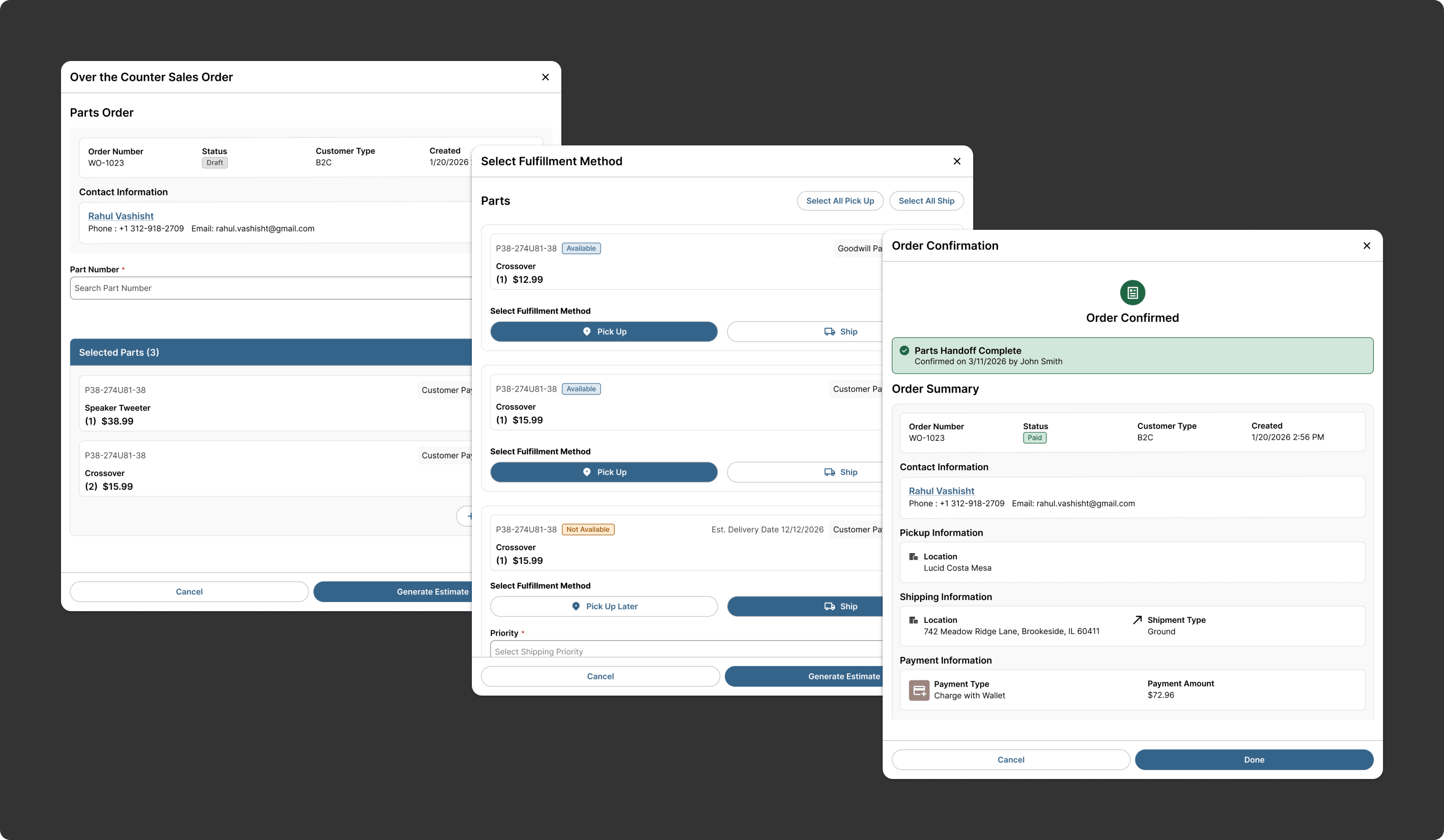
Over-The-Counter Sales Orders
Simplifying Over-The-Counter Parts Requests and Transactions
The OTC Flow concept focused on creating a smoother path for handling over-the-counter parts requests. This work addressed the need for a clearer experience around searching, selecting, and transacting parts outside of standard repair workflows while still maintaining consistency with the rest of the parts experience.
Why it mattered:
- Made OTC transactions easier to manage
- Supported a more efficient parts sales workflow
- Reduced friction in a common parts use case
- Created better consistency across parts interactions
Service Technician Concepts
Supporting Repair Execution with Less Friction and Better Documentation
Service Technicians need tools that help them focus on diagnosis and repair rather than spending unnecessary time on administrative steps. The concepts for this role focused on making the work order more useful as an execution tool, improving time tracking, and supporting clearer repair documentation so technicians can move through service tasks with less interruption.
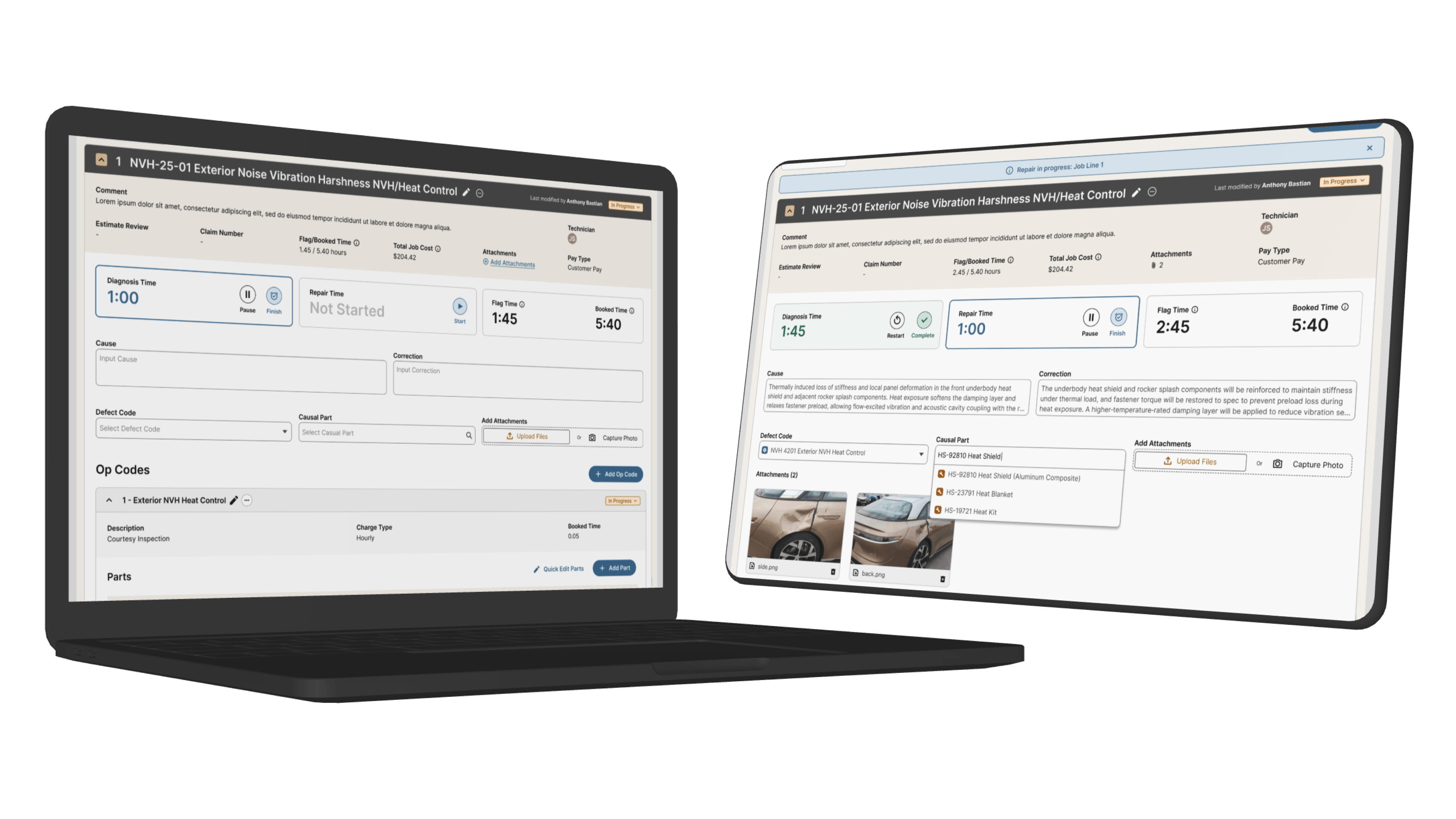
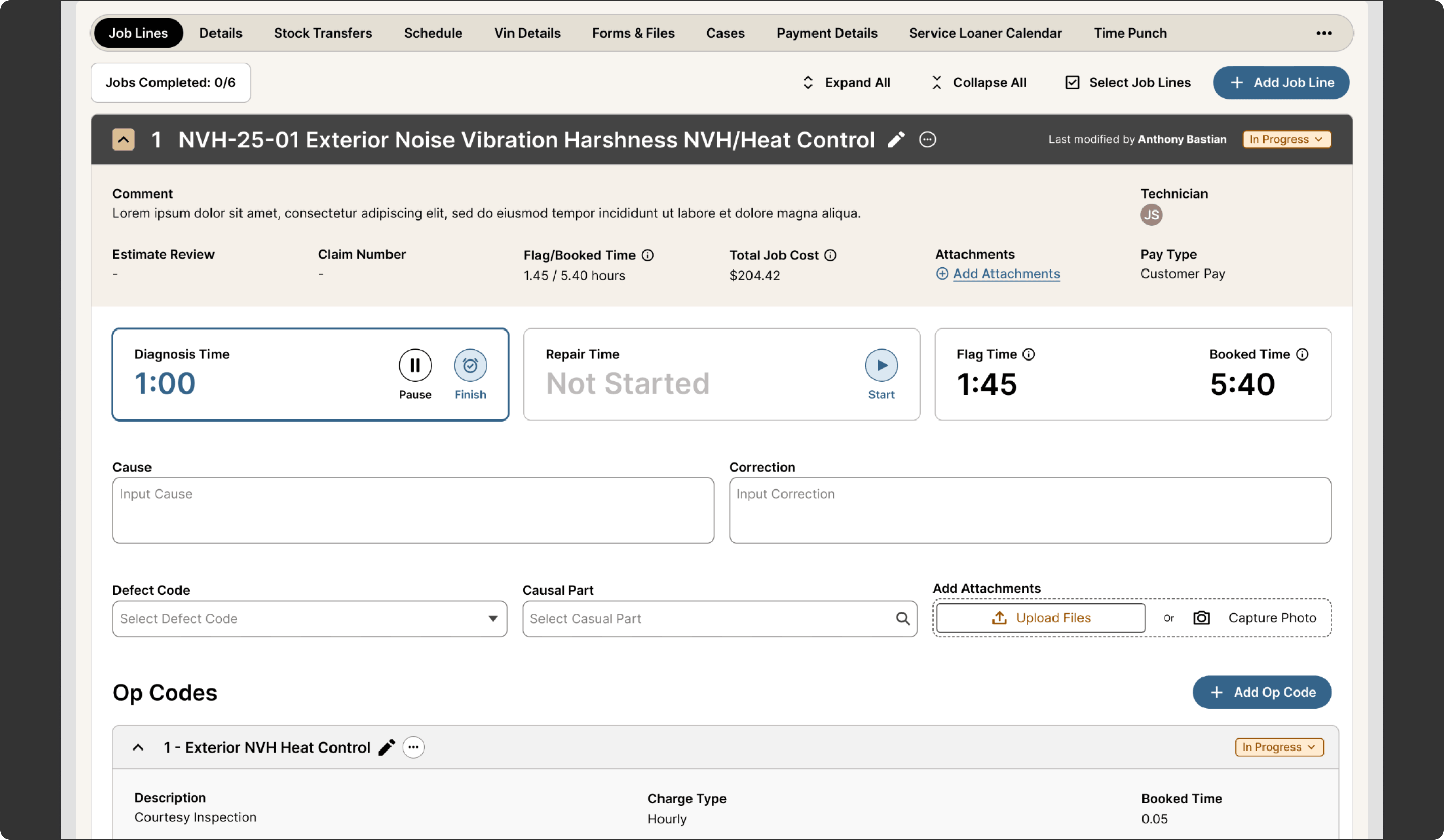
Work Order Technician View
Making the Work Order More Useful During Active Repair Work
The redesigned technician work order view organizes repairs into clearly defined job lines that make complex service work easier to manage and track. Each line brings together technician assignment, time tracking, cause and correction, defect and causal part inputs, attachments, op codes, and associated parts in one place. Technicians can start and pause diagnosis, begin repair work, track flag and booked time, and update progress within the line item, creating a more organized workflow that supports accurate documentation and better coordination across the repair process.
Why it mattered:
- Reduced friction during active repair work
- Improved labor tracking within the workflow
- Made job progress easier to manage and update
- Brought repair documentation and execution into one place
- Supported better coordination with advisors and parts teams
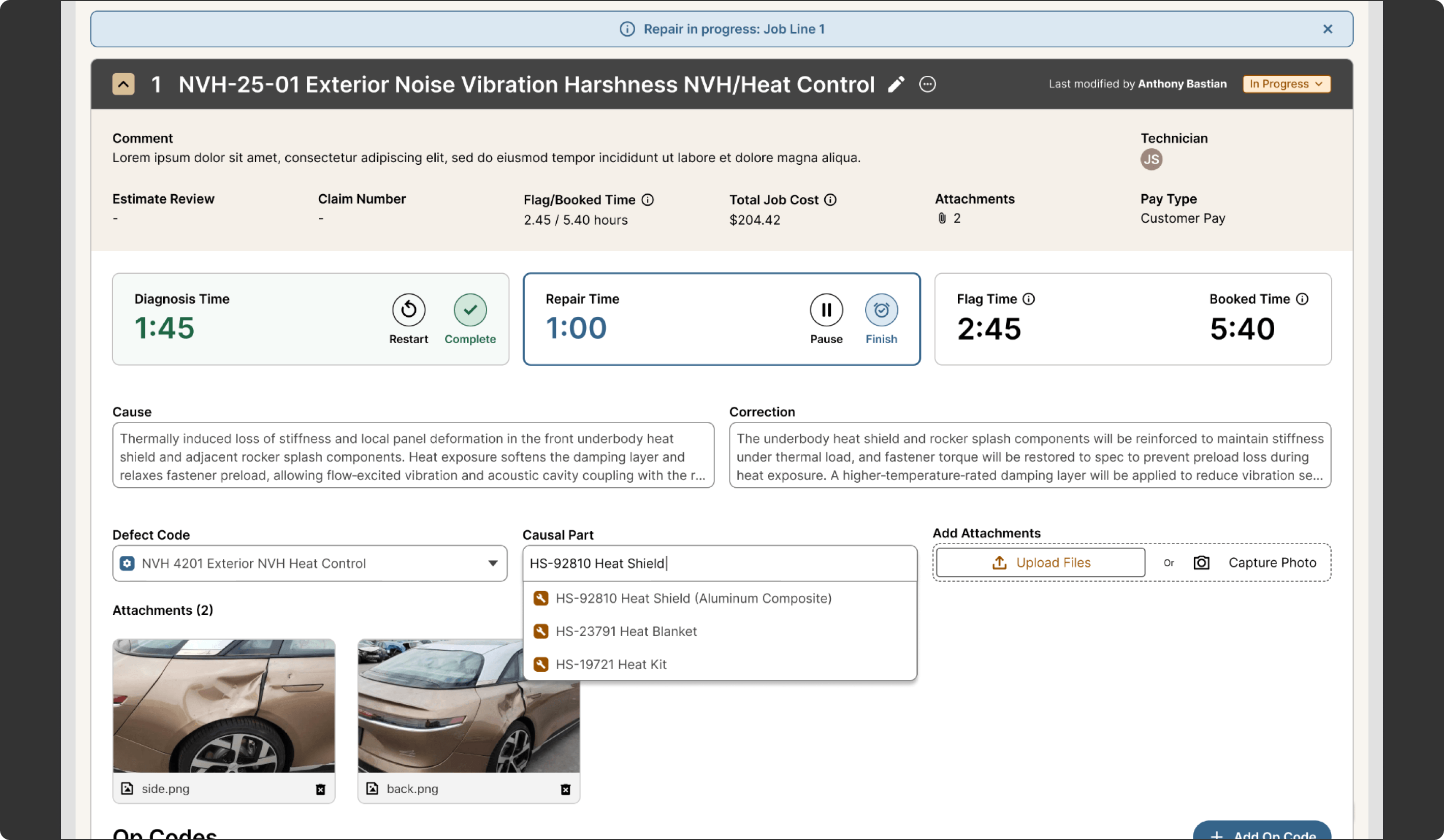
Repair Documentation
Creating a More Structured Way to Capture Service Work
The Repair Documentation concept was designed to support how technicians document cause, correction, notes, and related repair details as part of the work order workflow. Research showed that documentation could feel repetitive and disconnected from the work itself. This concept aimed to create a more intuitive structure for entering repair information while keeping it closely tied to the job being performed.
Why it mattered:
- Improved the documentation experience for technicians
- Reduced repetitive administrative effort
- Supported cleaner capture of repair details
- Helped connect service execution with service records more effectively
Shop Foreman / Manager Concepts
Creating Stronger Operational Visibility Across the Shop
Shop Foremen and Managers are responsible for understanding what is happening across the service center, identifying blockers, managing capacity, and keeping work moving. The concepts for these roles focused on improving operational visibility through dashboards and planning tools that help leaders monitor performance, coordinate resources, and respond more proactively throughout the day.
KPI Dashboard
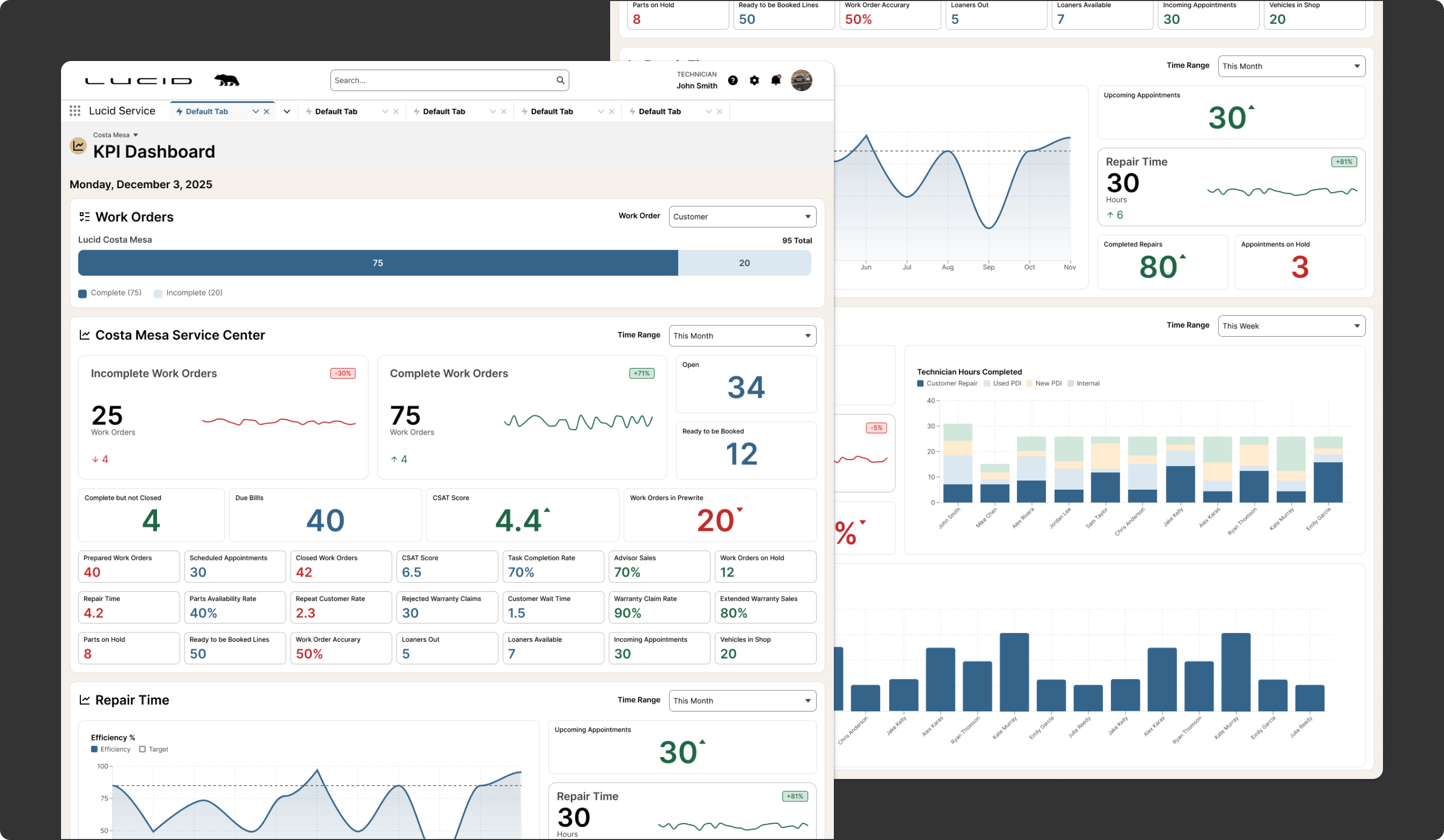
Giving Service Leaders a Better View of Shop Performance
The KPI Dashboard was designed to provide a clearer operational view into the health of the service center, including work volume, productivity, and areas that may need attention. Research showed that leaders often relied on separate dashboards, manual notes, or external reporting to understand performance. This concept created a more centralized view to support daily oversight and faster action.
Why it mattered:
- Improved visibility into shop performance
- Reduced dependence on outside reporting tools
- Helped leaders identify issues earlier
- Supported more proactive daily management
Loaner Dashboard
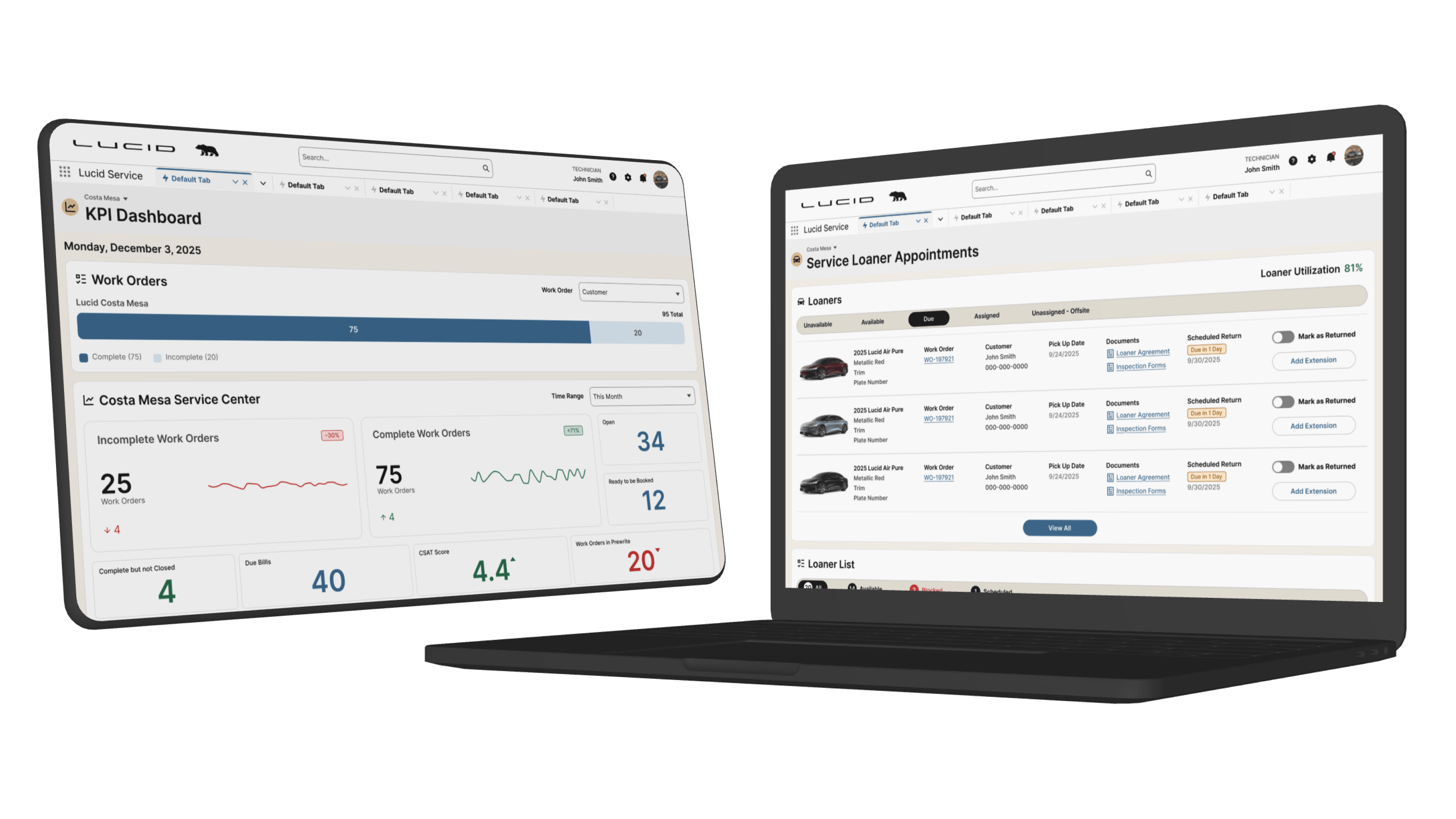
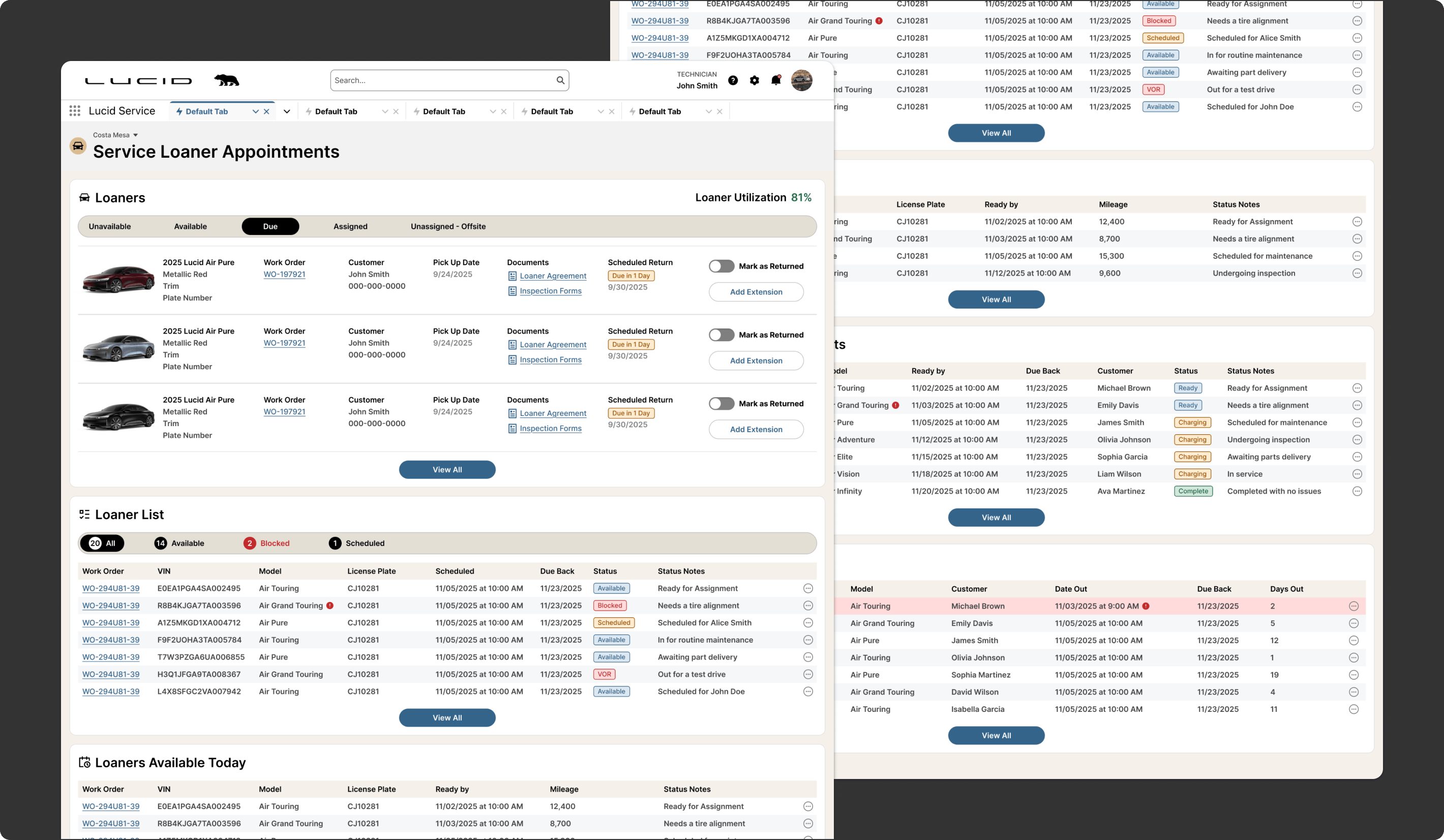
Making Loaner Operations Easier to Monitor and Manage
The Loaner Dashboard concept was designed to give foremen and managers better visibility into loaner inventory, assignment, and readiness. Since loaners are closely tied to appointment planning and customer service, the goal was to create a more usable view of this operational area so teams can coordinate more effectively and avoid surprises.
Why it mattered:
- Improved visibility into loaner status and availability
- Helped teams plan around customer transportation needs
- Reduced manual checking and follow-up
- Supported smoother coordination across service operations
Appointment Calendar
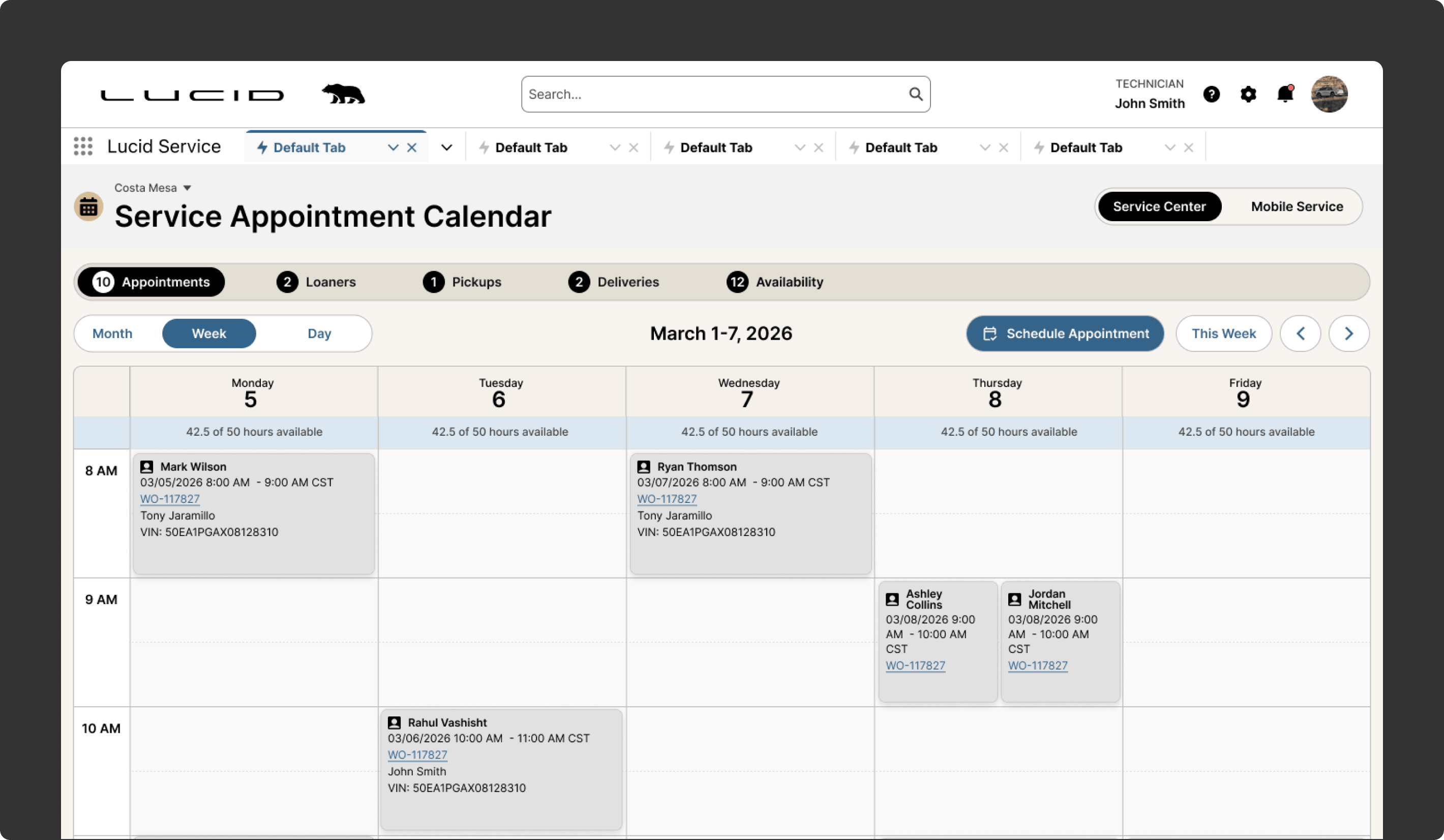
Bringing More Clarity to Service Scheduling and Capacity Planning
The Appointment Calendar was designed to help leaders understand service volume, shop capacity, and upcoming activity through a more visual planning view. Research showed that scheduling and operational planning often depended on fragmented tools or limited visibility into the full picture. This concept aimed to create a clearer way to manage upcoming service activity and support better coordination across the team.
Why it mattered:
- Improved visibility into upcoming service demand
- Supported better scheduling and planning decisions
- Helped leaders manage capacity more proactively
- Reduced reliance on separate scheduling tools
Takeaways

A Future-State Vision for a More Unified Service Operation
The Lucid DMS concepts created a more connected future-state vision for aftersales operations across service, parts, technician, and management workflows. The work translated research into role-based experience directions that reduce click-heavy interactions, improve data visibility, support stronger coordination, and give teams a clearer operational picture of the work in front of them. Just as importantly, the concepts helped define a more scalable product direction for how Lucid’s Salesforce-based service ecosystem could evolve over time.